Custom JavaScript tools
A custom tool gives an agent a new ability, such as looking up a product in your catalog or saving a note. It is one small JavaScript file. The agent calls it during a conversation when it needs it.
Add a tool
Ask Builder to write one, or add the file yourself in Files. Then open the agent's configuration and tick the tool under Tools > Custom tools. The list also shows tools that have an error, with what is wrong.
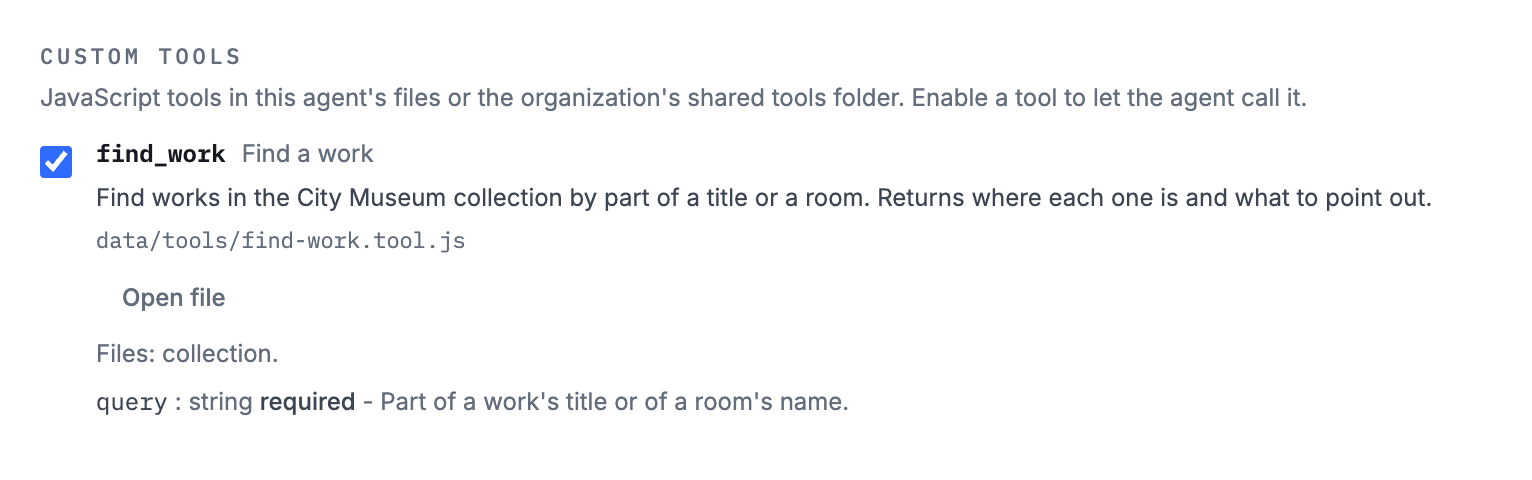
A tool can belong to one agent, or sit in the organization's files so several agents can use it.
What a tool can use
A tool gets only what its file asks for:
- Databases: read, and optionally write, a SQLite database kept in the agent's files.
- Files: read text files from the agent's files.
- A model: ask an AI model a question, with files or the current camera frame.
- The camera: let the model see the current camera frame. The tool itself never gets the picture.
Tools run isolated from the rest of WorldAgents, with no network access, so a tool cannot call an outside service. They are not available in public sessions, where people try an agent without signing in.
Technical reference
Exact names, paths, values and limits, for developers and AI assistants.
Where tool files go
- An agent's tool is
data/tools/<name>.tool.jsin the agent's folder:agents/<agent id>/data/tools/<name>.tool.jsin the organization's files. - A tool shared by the organization is
tools/<name>.tool.js, in thetoolsfolder at the root of the organization's files. A shared tool uses each calling agent's own data and database files. - The file name supplies the tool id:
search-catalog.tool.jsbecomessearch_catalog, with no added prefix. Use a lowercase kebab file name. Tool ids use lowercase letters, digits and underscores, up to 64 characters. - If names collide, the agent's file overrides the shared file, and file tools override built-in tools. The catalog shows the winning source and the overridden ones. A broken override reports an error; it never falls back to a different implementation.
Enable a tool
- Discovering a file does not enable it or run its
executefunction. Tick it under Tools > Custom tools, or add its id to thetoolsarray inagent.json. - No server change or restart is needed.
- Start a new session after changing source, schemas, permissions or enabled tools. An existing session rejects changed source rather than gaining new permissions mid-session.
- Config writes through Builder and MCP reject a missing or invalid enabled tool. New sessions check the files again, including changes made outside the app. Broken tools stay visible in the catalog for repair.
- A session inspects only enabled files, with at most 16 file tools per agent.
Write a tool
A minimal tool, at data/tools/search-catalog.tool.js:
  export const schemaVersion = "worldagents.tool.v1";
export const metadata = { title: "Search catalog", description: "Find products by name." };
export const inputSchema = {
  type: "object", properties: { query: { type: "string", minLength: 1 } },
  required: ["query"], additionalProperties: false,
};
export const capabilities = { databases: { catalog: { path: "databases/catalog.sqlite", mode: "read" } } };
export async function execute(ctx, input) {
  return ctx.db.query("catalog", "SELECT name FROM products WHERE name LIKE ? LIMIT 5", ["%" + input.query + "%"]);
}
- Required exports:
schemaVersion = "worldagents.tool.v1",metadata: {title, description}, an objectinputSchemawithadditionalProperties: false, andexecute(ctx, input). - Optional exports:
capabilities, andtimeoutMs(default 30000, maximum 120000). - Use direct named exports. Imports and
requireare unavailable. executereturns a JSON value or a Promise. Arguments are checked against the input schema before it runs.ctx.wait(ms)waits within the same deadline.
Capabilities
A tool gets only the grants its capabilities export names.
| Exported grant | Context API |
|---|---|
databases: {catalog: {path: "databases/catalog.sqlite", mode: "read"}} | await ctx.db.query("catalog", sql, parameters) returns {rows, truncated}. Read-only connection, one SELECT/WITH, at most 100 rows or 128 KiB, two-second deadline. |
Database mode: "write" | Also permits ctx.db.execute(name, sql, parameters) for a single INSERT, UPDATE, DELETE, REPLACE, CREATE TABLE or CREATE INDEX. Returns {changes,lastInsertRowid}. |
files: ["catalog"] | ctx.files.read("catalog/file.json") returns {path,text}. Also grants those files to LLM calls. Paths stay inside agent data. |
llm: {maxCalls: 3, models: ["default"]} | ctx.llm.generate({system,prompt,messages,data,files,schema,thinking,model,includeCurrentFrame}) returns {text,json}, using the trigger LLM helper. Up to six calls and eight files per call. |
camera: true | ctx.camera.available and capturedAt; permits includeCurrentFrame in LLM calls. Raw camera bytes are not handed to the script. |
Also on ctx, without a grant:
ctx.now,ctx.agentandctx.sessionexpose time and nonsecret identity and mode metadata.ctx.conversation.recentTurnscontains up to twelve recent messages.
Model calls
- Sequential and parallel LLM calls share the tool's deadline and budget.
- Model calls have no tools themselves, and get the model's full output limit, thinking included.
defaultuses the platform's Google text model. A deployment may offer other model aliases. Scripts receive aliases, never API keys.- A tool cannot call an outside API.
- The camera image is a snapshot taken when the tool starts. A frame received more than 15 seconds ago is unavailable, so a tool cannot silently reuse an old camera session.
- All calls and their outcomes appear in the normal session tool log.
Databases
- Database files live only in the calling agent's
data/databasesfolder. - Always bind SQL parameters. There are no attachments, arbitrary pragmas or extension loading.
- A writable database is shared across this agent's sessions and users. Use it for an intentionally shared or single-wearer store, not for private per-user data.
- Integers come back as strings, since they may exceed what JSON numbers hold, and blobs come back as base64.
- Result truncation is explicit:
truncatedsays so. - A query that passes its deadline is interrupted. SQLite's memory is capped at 64 MiB per session.
Limits
- Text files and tool inputs and results: 256 KiB each.
- Capability calls: at most 32 per run, eight at a time.
- Memory: 128 MiB per run.
The tool catalog
- The catalog lists built-in and custom tools for an agent, with schemas, permissions, enabled ids and file errors. Enabled tools appear first.
- The catalog checks 16 files per page. A file it ran out of time for says so in its own entry.
- Follow
pagination.nextOffsetby passingoffsettotool_catalog. The app has a Load more button. - An overridden file is never run, at session start or in the catalog.
Through AI connections and Builder
- Builder in the web app uses the same tools as AI connections, with its organization supplied automatically. Through MCP,
help {topic: "tools"}returns this page. - Use
tool_catalog {organizationId,agentId,offset?}to inspect tools, file errors and enabled ids before enabling one. - Write source and configuration through revision-checked
write_fileoredit_file. Agent paths areagents/<agentId>/data/tools/<name>.tool.js, and shared paths aretools/<name>.tool.js. - Read
agent.jsonbefore editing itstoolsarray. - Upload a prepared SQLite database through
upload_fileorfile_transfer.
In the older Agent Builder
- The older Agent Builder, still used by the phone apps, sees the agent's data at
/agentand organization tools under/org/shared/tools/. - It writes files with
apply_patch, callstool_catalogto check schemas and file errors, then edits the enabledtoolsarray and callsvalidate_agent.
Isolation
- Custom tools run like triggers: every call gets a fresh sandbox child process with only that file's grants, answered by the session runtime. Different tools and sessions never share a process.
- The child has no network, organization files, credentials or writable system mounts.
- Source discovery also runs in that sandbox, without capabilities.
- Deadlines and session cancellation abort outstanding host work.
- Custom tools are unavailable in public sessions.